
This page describes a web page (and CSS + some javascript) which provides a simple web player for an Icecast internet radio stream, with now-playing track information but minimal inconvenience. This is offered for free, download and instructions are below.
Here is a link to a working demo of version 1.1.0 of BTR Free Player. The streams presented are from third-party sources, click the big main stream name (in the biggest greenest text) to visit their websites.
Features
BTR Free Player can play Icecast and Shoutcast streams in most formats. If ICY-metadata is properly available from the stream server, that can be displayed in real time to show the “Now Playing” track information. It has a volume control, support for multiple different stream sources to be defined (or it can be used with just one stream and the selection buttons will not be shown), and can use a first-party cookie to save the visitor’s previous volume and stream selection.
Project Background
You will need your own web hosting where you can place HTML, CSS and Javascript files, and the understanding of how to do that.
Icecast MP3 internet radio streams can be played directly in most modern web browsers. But doing it in that simple way is not very attractive and does not handle showing live now-playing data – so no ability to display “Artist – Title”.
There are paid-for services that make this work by adding a dependency on the third-party server to do something which ends up with them providing a stream-player integration which brings in now-playing data. But that’s not terribly fun if I want to just play with an Icecast stream on my own play server.
I found an excellent Javascript library called “icecast-metadata-player” which handles playing internet radio streams (including other formats like OGG and FLAC, not just MP3), deals with browser variances, and gets now-playing data without requiring any extra server-side support (beyond the Icecast server and source being properly configured). I am hugely thankful to the author of that library for their work.
Then I declared cowardice and laziness – having not learned much Javascript or front-end web development and no inclination to learn it right now – and got an AI to build a simple but attractive-enough stream player webpage around that library.
The end result is one HTML file of “the player page”, one CSS file to make it look like something, and one custom javascript file. These need to be combined with the icecast-metadata-player library (linked above, it is GNU LGPL 3.0-or-newer licensed) to work – that is not included in the download offered below.
I only prompted an AI to create this for me because I couldn’t find any player scripts that met my needs as described above. That has already happened, past-tense. I figure if I share the result openly, others might find and use this – rather than tasking another LLM to do the same work over again.
Screenshot
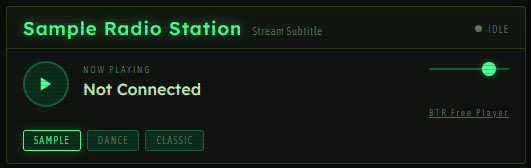
This is a screenshot of the player. All of the fixed text can easily be changed by editing the player.html file and all the styling is in a separate player.css file which you are also free to change.
Demo
A working demo of version 1.1.0 is available to try. The streams available in this demo are from third parties.
Copyright, Licence, Etc.
Although I gave directions and asked for tweaks and changes, this project was Robowritten. Created primarily by machine. In my understanding of copyright law, it may not actually merit any copyright protection.
As far as “a licence” for any aspect of this project that might be deemed human-created or capable of meriting copyright protection (except for the name), I release this project under the WTFPL. You can use it however you wish, edit it slightly or massively. Redistribute your changed version if you like – the only requirement is that you use a different name if you distribute your derivative work.
Be aware that compliance with the different (GNU LGPL) licence of the icecast-metadata-player library is your responsibility, if you modify or redistribute that code.
For the sake of things having names, I’m calling this “BTR Free Player“. This name was chosen creatively by me, a human, and I exclude that name from the licence / waiver above. That name can be used to describe this project, used to link back to here, but not used to describe modified versions that you distribute with the intent that other people use them on their own sites. If you change it and re-share it (beyond just using it on your site), give it a different name. You can strip my chosen name off entirely if you like, you are not required to give attribution or credit.
I have taken good and reasonable care in my participation in the creation and documentation of this project and cannot imagine how it might cause harm or damage. However, no guarantee is provided and no liability accepted – proceed at your own risk.
Instructions and Downloads
Before you download BTR Free Player, you need to do these steps:
- Download version 1.17.13 of the icecast-metadata-player library from this page on Github (scroll down to the “Assets” section and pick “Source code (zip)”)
- Unpack that zip archive on your computer to somewhere sensible – NOT the working folder where you’re putting the player for your site together
- Then, inside what you’ve just unpacked, find this sub-folder: icecast-metadata-js-icecast-metadata-player-1.17.13\src\icecast-metadata-player\build
- Copy the .js files from that sub-folder to your working folder (which is probably some part of your local copy of your website)
Once you’ve done that, you should have “icecast-metadata-player-1.17.13.main.min.js” and a number of other .min.js files in your working folder (8 in all).
You are now ready to download BTR Free Player itself. Here is the download link:
(Download link is now for updated version 1.1.0)
Now, back to instructions:
- Unzip that archive directly in to your working folder
- This adds 3 more files: player.html, player.css and player.js
- In Version 1.1.0, stream URL(s) are now defined in a very obvious script block within player.html.
Ok, that’s the bare minimum, now let’s do some simple customisation of text. Edit player.html and review the following details:
- The <title> tag block wants changing, if you’re going to use player.html as a standalone page on your site
- <span class=”callsign”> and <span class=”freq”> will have their contents replaced once the player.js script loads, so what you put here is not very important.
- <div class=”np-label”> is the text literal “NOW PLAYING”, you could change that if you wish
- <div class=”np-track” id=”trackDisplay”> has the text that is shown before the stream is played, but note that the javascript code in player.js will set it back to “Not Connected” when the stream is stopped.
The basic settings for the player are now defined in the <script> tag block near the bottom of player.html:
- USE_COOKIES – this can either be true or false, this enables or disables the use of a first-party cookie (local to your domain name) to store listener’s current volume setting and chosen stream (if you have multiple streams defined)
- CookiePrefix – if you wished to have different versions of the player on the same domain name, offering different selections of streams, make this string value unique for each different player. This will keep the cookies separated for players you intend to behave differently
- STREAMS – this is a list of stream configurations. Follow the formatting in the samples, it’s Javascript. The elements for each stream are:
- title: “Main stream title”
- subtitle: “Small subtitle or description of stream”
- name: “name” – short name to be shown on stream-selection button
- url: “https://some.stream.server.example.com/mountpoint” – URL of the stream itself
- metadata: true or false (note: don’t use quotes!) – does this stream URL correctly provide ICY-Metadata support?
- website: “https://someradio.example.com” – this item is optional. If present, the text set by title: will be a hyperlink to this address. If absent, that text won’t link to anywhere.
If you’re playing someone else’s radio stream, you have no control over if ICY-Metadata works on their stream server or not. If you set metadata: true when configuring this player for a stream which does not have working metadata, the stream simply will not work – at all. You will have to set metadata: false for that stream.
For metadata to work on a stream server that is under your control, that requires a number of things to all be working correctly together – the media source that provides the stream content, the Icecast server itself, and any HTTP/HTTPS reverse-proxy server that is running in front of Icecast. Getting CORS and Accept-Headers settings correct is very far beyond the scope of this project or its documentation.
You are absolutely 100% welcome to change or remove the contents of the <div class=”credit-row”> element, or remove it entirely. Go ahead and remove that link that points back to this page if you wish – don’t feel bad about “removing credit”. You can remove the various other comments and suchlike that link back to here (in the player.js file, for example) if you like. Rip this to bits and rebuild to suit your needs and wants.
Save your file changes and test locally by opening player.html in some browsers on your computer. Then, upload all of the stuff in your working folder to your website in whatever way you see fit.
If you want to take the guts of player.html and add it in to another page on your site instead of using player.html as-is, go right ahead. If you break it, you’ve got the pieces. If you want to use different fonts you can find others at Bunny Fonts – they are defined entirely in player.css. Sorry, I can’t provide personal help on customising or integration.
Reminder: Websites served over HTTPS require the Icecast stream to also be delivered over HTTPS, otherwise things might not work. For more details on this and other potential issues, see the Github documentation for the icecast-metadata-player library.